ACON is optimized for viewing in Chrome.
Open with Chrome
Don't show for 30 days
Products & Files

The textures are not showing.


Please check the following in order.

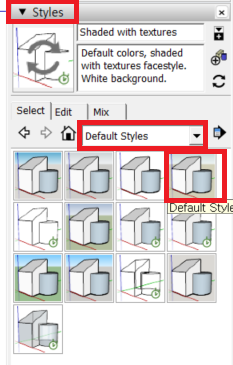
  1. Change the style settings to the default style or texture mode.
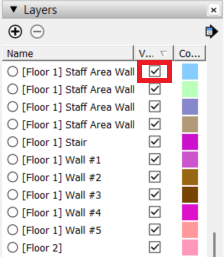
  2. Make sure Layers/Tags are turned on.


📌 Please note
Some products may be saved in a solid-color format for performance optimization.
Please check the style settings and make sure all layers (tags) are enabled, as described above.


📩 If the issue is not resolved, please contact us through 1:1 Inquiry with the product information and a screenshot of the relevant screen.

Was this helpful?

Company: carpenstreet Inc.
Representative: Minhong Daniel Lee
Address: 8F, 27, Eonju-ro 93-gil, Gangnam-gu, Seoul, Republic of Korea
Mail order business registration number: 2021-SeoulGangnam-04401
KOR Business Registration Number: 364-87-01374 KOR Business information confirmation >
Personal Information Manager: Minhong Daniel Lee
Contact: cs@acon3d.com
Hosting provided by NHN godo
Carpenstreet Co.,Ltd is a mail order broker and is not a party to mail order, and therefore is not responsible for any disputes arising from transactions established between members or information provided and registered by the seller.
copyright (c) www.acon3d.com all rights reserved.